profile-filament-plugin
Configuration
User Menu
On this page
- Introduction
- Setting the link label
- Setting the link icon
- Configuring the profile menu item
- Hiding the user menu item
Introduction
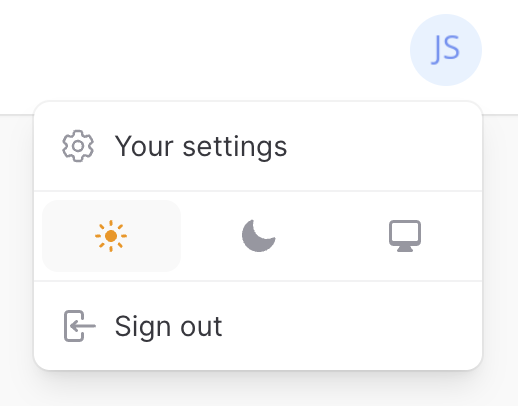
The plugin automatically registers the profile link for the user menu. We handle setting some defaults for the link such as the label, icon and url to the plugin's default profile page.
Here is a screenshot of the default link we will register:
Setting the link label
By default, we show the authenticated user's name as the label for the profile link. You can set your own label by using the useProfileMenuLabel() method on the plugin:
use Rawilk\ProfileFilament\ProfileFilamentPlugin;

ProfileFilamentPlugin::make()
    ->useProfileMenuLabel('My profile')
{tip} You may pass in a closure to this method if you need to dynamically generate the label.
Setting the link icon
We defer to filament's PanelsIconAlias::USER_MENU_PROFILE_ITEM icon for the profile link's icon. To use a different icon, you can pass it to the useProfileMenuIcon() method on the plugin:
use Rawilk\ProfileFilament\ProfileFilamentPlugin;
use Filament\Support\Icons\Heroicon;

ProfileFilamentPlugin::make()
    ->useProfileMenuIcon(Heroicon::OutlinedCog)
Configuring the profile menu item
If you need more control and configuration over the profile menu item link, you may provide a closure to the configureProfileMenuItemAction() method on the plugin. We will evaluate the closure after we perform our own configurations on the action, and your closure can accept the action as a parameter.
use Rawilk\ProfileFilament\ProfileFilamentPlugin;
use Filament\Actions\Action;

ProfileFilamentPlugin::make()
    ->configureProfileMenuItemAction(
        fn (Action $action) => $action
            ->badge('My badge')
            ->url('/foo')
    )
Hiding the user menu item
If you'd rather not show the user profile menu item at all, you can completely remove it by using the hideFromUserMenu() method on the plugin:
use Rawilk\ProfileFilament\ProfileFilamentPlugin;

ProfileFilamentPlugin::make()
    ->hideFromUserMenu()